

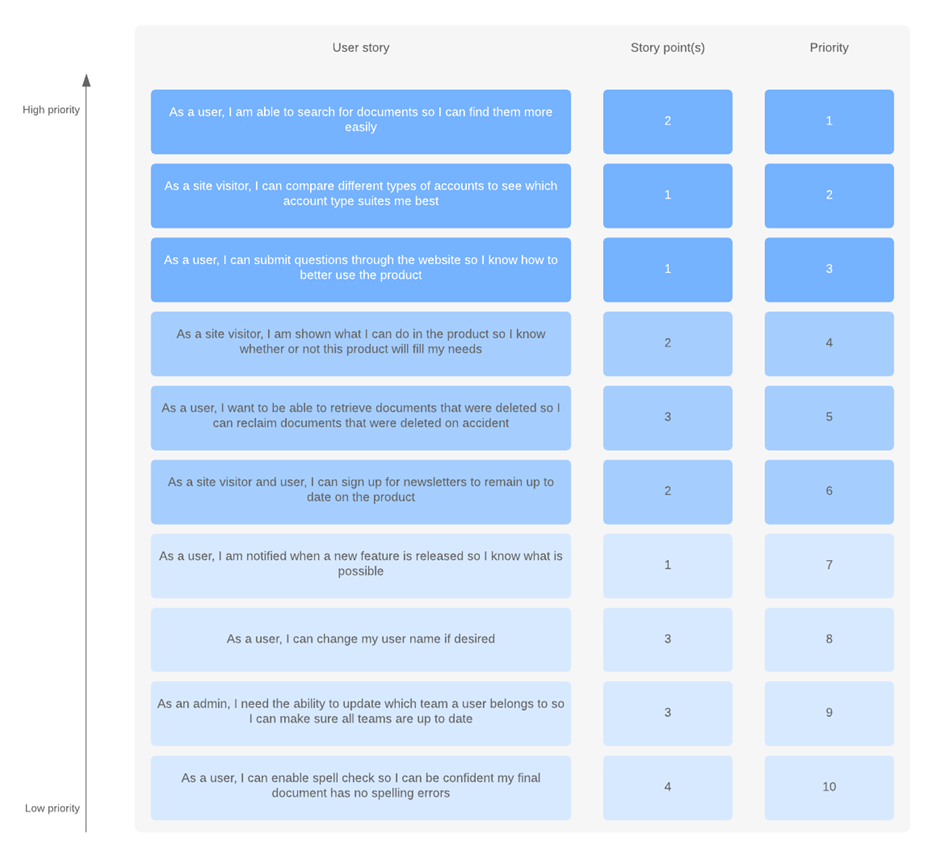
A product backlog in Agile is, essentially, a list of items that are “on deck” for the development team. It’s a to-do list of items that need to be completed within a larger product. It’s worth noting that these aren’t items that you’re working on within the two-week sprint, but it helps you see what’s coming up so your team can plan and work quickly to release new features.
A product backlog is a prioritized list of work for the development team that is derived from the roadmap and its requirements. The most important items are shown at the top of the product backlog so the team knows what to deliver first. The development team doesn’t work through the backlog at the product owner’s pace and the product owner isn’t pushing work to the development team. Instead, the development team pulls work from the product backlog as there is capacity for it, either continually (kanban) or by iteration (scrum).
“Keep everything in one issue tracker–don’t use multiple systems to track bugs, requirements, and engineering work items. If it’s work for the development team, keep it in a single backlog.”
The product backlog sits outside of the sprint loop (meaning it contains work that will not be completed during the current sprint) but informs how your sprint will be planned. The product backlog is composed of feedback from:
- The development team
- Customer
- Stakeholders
Why does a product backlog matter?
Think of a product backlog as a way of putting a brainstorm or a product plan into action. You’ll undoubtedly be approached by stakeholders (or customers) who have many ideas for improving the product. Not all the ideas are good and not all the ideas are valuable, but without an organized product backlog, it’s difficult to differentiate between the great, valuable ideas and the ideas that would only be a waste of time. Here are some other benefits of the product backlog:
- It’s an organized list that’s easily wrangled.
- It’s simple to prioritize.
- It can be changed as priorities change.
- It allows you to immediately see dependencies and order them.
- It allows you to think about products in the long-term, not just in terms of immediate needs.
In short, a product backlog allows you and your team to make systematic, smart improvements to a product over the long haul.
What’s in the product backlog?
The Scrum Guide is fairly prescriptive about what can be in the product backlog, which is helpful for keeping unnecessary items out. The product backlog contains:
- Features
- Functions
- Requirements
- Enhancements
- Fixes
It’s not just a simple to-do list, though. Each item in the product backlog:
- Adds value for the customer
- Is prioritized
- Is estimated
There should be no low-level tasks in your backlog (like sending emails), and the backlog itself should be a living document that’s regularly rearranged.
How to create a product backlog
It’s common for product backlogs to be presented in the form of a spreadsheet, but there’s a big problem with that: Spreadsheets aren’t meant to have their rows constantly moved. Plus, you’ll find yourself dealing with formatting issues and the ensuing migraine.
Product backlog—it’s a living document that’s easy to share with stakeholders and rearrange however you’d like.
- Add ideas to the backlog –
Stakeholders will typically be approaching you with ideas for product improvements - Get clarification –
Once you’re approached by a stakeholder with a product addition or fix, make sure you understand:
- The reason behind the addition or fix
- The amount of value it contributes to the product as a whole
- The specifications of the item
3. Prioritize
The backlog should have clearly defined, high-priority items at the top and vague items that are not a priority at the bottom. If an item has no value, it should not be added to the backlog.
4. Update the backlog regularly
The backlog is a living document; make sure you’re constantly prioritizing, refining, and keeping the backlog up to date.
You may have hundreds of items in your backlog as ideas for product improvements are suggested. Some of these items may be discarded, but many of them will begin making their way up the backlog for further refinement and, ultimately, development.
Start with the two “R”s
A team’s roadmap and requirements provide the foundation for the product backlog. Roadmap initiatives break down into several epics, and each epic will have several requirements and user stories.
The product owner then organizes each of the user stories into a single list for the development team. The product owner may choose to deliver a complete epic first . Or, it may be more important to the program to test booking a discounted flight which requires stories from several epics.
What may influence a product owner’s prioritization?
- Customer priority
- Urgency of getting feedback
- Relative implementation difficulty
- Symbiotic relationships between work items (e.g. B is easier if we do A first)
While the product owner is tasked with prioritizing the backlog, it’s not done in a vacuum. Effective product owners seek input and feedback from customers, designers, and the development team to optimize everyone’s workload and the product delivery.
Keeping the backlog healthy
Once the product backlog is built, it’s important to regularly maintain it to keep pace with the program. Product owners should review the backlog before each iteration planning meeting to ensure prioritization is correct and feedback from the last iteration has been incorporated. Regular review of the backlog is often called “backlog grooming” in agile circles(some use the term backlog refinement).
Once the backlog gets larger, product owners need to group the backlog into near-term and long-term items. Near-term items need to be fully fleshed out before they are labeled as such. This means complete user stories have been drawn up, collaboration with design and development has been sorted out, and estimates from development have been made. Longer term items can remain a bit vague, though it’s a good idea to get a rough estimate from the development team to help prioritize them. The key word here is “rough”: estimates will change once the team fully understands and begins work on those longer term items.
The backlog serves as the connection between the product owner and the development team. The product owner is free to re-prioritize work in the backlog at any time due to customer feedback, refining estimates, and new requirements. Once work is in progress, though, keep changes to a minimum as they disrupt the development team and affect focus, flow, and morale.
Once the backlog grows beyond the team’s long term capacity, it’s okay to close issues the team will never get to. Flag those issues with a specific resolution like “out of scope” in the team’s issue tracker to use for research later.
Anti-patterns to watch for
- The product owner prioritizes the backlog at the start of the project, but doesn’t adjust it as feedback rolls in from developers and stakeholders.
- The team limits items on the backlog to those that are customer-facing.
- The backlog is kept as a document stored locally and shared infrequently, preventing interested parties from getting updates.
Product owners dictate the priority of work items in the backlog, while the development team dictates the velocity through the backlog. This can be a tenuous relationship for new product owners who want to “push” work to the team. Learn more in our article about work-in-progress limits and flow.